
QOS & Firewall Configuration
What Is VoIP QoS & How It Boosts Call Quality?
Key Takeaways
- Ensuring VoIP Quality of Service is essential to avoid packet loss and latency, enabling seamless communication during peak network times, especially for video conferencing.
- Quality of Service (QoS) includes processes such as classifying, marking, shaping, and queueing data packets, prioritizing real-time data like voice and video for smoother transmission.
- For optimal call quality and user experience, it is best to select a dependable provider, utilize wired connections, and monitor network performance.
What is the Quality of Service for VoIP?
Boost Call Quality with VoIP QoS Components
QoS consists of 6 key components that address specific issues and offer significant benefits for your calls:
| Element | Meaning | Problems Addressed | Benefits |
|---|---|---|---|
| Bandwidth Allocation | Ensures there’s enough data capacity for smooth voice calls. | Call drops and quality issues during high traffic. | Reliable voice communication in high demand. |
| Managing Latency | Controls wait time before data transfer begins. | Delays in conversations. | Minimizes lag, improving user experience. |
| Jitter Control | Manages variation in data arrival times. | Choppy or dropped audio. | Consistent and high-quality voice transmissions. |
| Packet Loss Prevention | Prevents loss of voice data in the network. | Interruptions in conversations. | Reliable voice transmission without data loss. |
| Traffic Prioritisation | Prioritises voice traffic over other data types. | Call quality issues during peak usage. | Ensures clear voice communications. |
| QoS Policies and Mechanisms | Rules and techniques for managing voice service quality. | Interrupted meetings, poor audio, delays, dropped calls. | Reliable and high-quality communication. |
Recommended Practices for VoIP Quality of Service
Adopting these practices will ensure consistently excellent call quality:
- Frequently verify your internet connection to ensure your network provides adequate bandwidth for VoIP calls.
- Use reliable Ethernet cables : Choose CAT6 Ethernet cables to improve data transfer and reduce latency.
- Disable VPN : If you're using a VPN, please either disable it completely or refrain from using it while accessing CloudOne Services.
- Use wired instead of wireless networks: Wireless (WiFi) networks deal with increased latency due to wireless interference, distance between devices, and lack of stability (walls can slow down your WiFi, for example). Consider the benefits of using wired connections where possible.
- Monitor your network: Keep an eye on metrics such as latency, ping, and jitter, as these can indicate potential network congestion.
ISP Plan: ISPs offer business-class & home internet. Business Class & Dedicated Internet connection are preferred. Most ISPs (Internet Service Providers) prioritise services such as web surfing while neglecting VoIP. Transporting voice packets requires an additional set of Internet Protocols that your ISP may not be providing. Ask your ISP to Prioritise VoIP
Router does not support VoIP. Ensure network routers support VoIP prioritisation. Small businesses often use one internet connection for both voice and other data traffic. Therefore, if the router is not configured to prioritize VoIP traffic, call quality can be impacted by other interactions taking place over the network. For example, a file download could downgrade the quality of a phone call taking place if the router doesn't have the instructions or capability to allocate resources for the phone call.
Best VoIP Hardware for High-Quality Calls:
- Example: A business upgraded to QoS-compatible VoIP routers and experienced a 30% improvement in call clarity.
- Takeaway: The right VoIP hardware improves reliability and reduces call issues.
- QoS-Enabled Routers → Support VoIP traffic prioritization
- Gigabit Ethernet Switches → Ensure stable network connectivity for VoIP.
- Noise-Canceling VoIP Headsets ie Yealink Headsets→ Reduce background interference.
It is recommended to consider the following recommended Mobile specifications:
iOS 15+ | Android: Version 8+ with 4GB RAM
It is recommended to consider the following recommended User PC specifications:
Intel i3 / AMD Ryzen 3 or higher (Processor)
RAM 8GB (memory)
Disk Type = SSD (Solid State Drive)
Windows 10/11 or macOS Operating System
Google Chrome requires Version 87 or later
USB Port or Audio Port for Mic Headset
Required Client System Permissions
- Microphone: Mandatory for making and receiving audio and video calls.
- Contacts: Required to synchronize your phone's native contacts with the Linkus app, allowing you to call mobile contacts through the PBX system.
- Nearby Devices (Bluetooth): Required on Android 12 and later to use Bluetooth headsets or earphones for calls. The app may refuse to place calls if this is not granted.
- Phone/Call Logs: Necessary for the app to manage calls, view call history, and set Calling App as your default phone application.
- Notifications: Essential for receiving alerts for incoming calls and instant messages
Feature-Specific Permissions
- Camera: Only required if you intend to use video conferencing or one-on-one video calls.
- Storage/Files: Needed for Instant Messaging (IM) if you plan to send or receive images and files through the app's chat feature.
- Location: While not always strictly mandatory for calling, some network-related features or advanced security settings may request this.
Please note that this is the minimum recommended specification.
If the customer's PC is not to it’s optimum performance, it can be upgraded with some components, like additional RAM (Memory), Hard Disk type, and others. With this, VOIP quality is not guaranteed if other installed applications require a lot of resources.
Do I need to configure my on-premise firewall for Cloud One SIP Trunks?
Yes , The customer is responsible for a firewall & quality of service configuration at customer site as per the router or firewall vendor recommendations
📄 Firewall Configuration for Cloud One SIP Trunks
Do I need to configure my on-premise firewall for Cloud One hosted phone system?
Yes , Customer is responsible for your voice optimised firewall & QOS configuration at customer site as per the router or firewall vendor recommendations
⚙️ Firewall configuration for Cloud One hosted phone system
Call and Voice Quality
As Cloud One is an ISP agnostic VoIP provider operating an OTT (Over the Top) service , QOS is usually determined by the customer ISP , Firewall & Network.
Check on your office internet stability by running a speed test from your PC to Cloud One Network located at https://speedtest.cloudone.co (This measures the jitter & bandwidth on your network to Cloud One Network). Jitter should be below 10-15ms. This is the delay between sent and received packets. The sound quality will degrade if the delay is longer. The transmitted packets should reach the recipient as soon as possible to allow for a good real time relation.
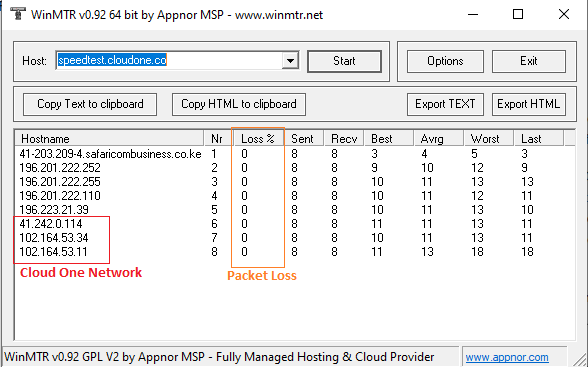
To check for packet loss do the following:
- Download WINMTR here
- Once you download the ZIP file containing WINMTR, unzip and install it on your computer using the standard application installation procedure.
Open the application and in the space written host, indicate your host which can be either the following
- speedtest.cloudone.co
- Your hosted pbx fdqn ie customer.cloudone.co
- cs01.cloudone.co.ke or ls02.cloudone.co.ke ( Your Cloud One SIP Trunk Server)
If there is packet loss on any hosts other than Cloud One Network from 41.242.0.114 , then the issue is with your local network or upstream ISP. Kindly contact your ISP or your local network IT person for checks
To check if the issue is the ISP connection, simply switch from your office WIFI/LAN to 4G hotspot and make a test call to compare the quality. If the call on 4G is of good quality then the issue is your office WIFI or Local LAN or your ISP